Make Your WooCommerce Store Feel More Trustworthy in Minutes
Treder Woo TrustProof Premium adds a polished admin control center on top of the free plugin. Set your store details, then use Premium Studio to design a trust box that matches your brand.
Premium helps you present clearer trust signals, stronger buyer guidance, and a more reassuring storefront experience, with an exportable trust report you can share or keep on file.
From base settings to a polished trust box
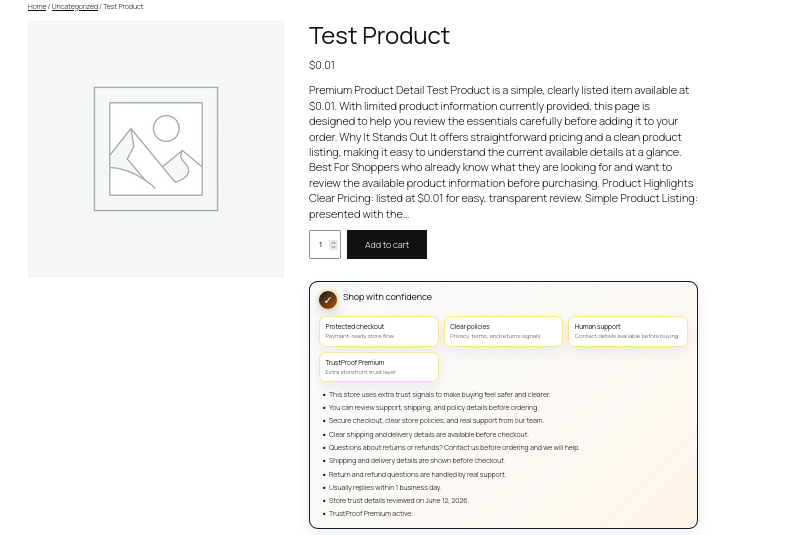
Start with Base Store Settings, polish the design in Premium Studio, then show a refined trust box to shoppers.
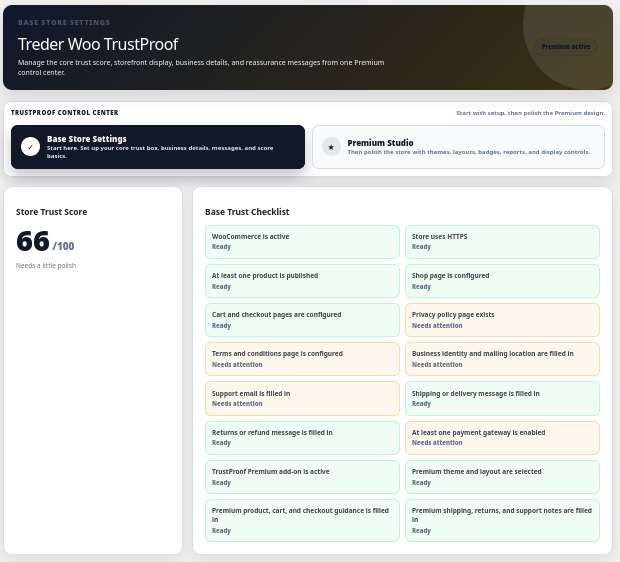
Base Store Settings first, then Premium Studio
Premium keeps the setup order clear. Fill in your store details first, then move on to design polish.
1. Base Store Settings
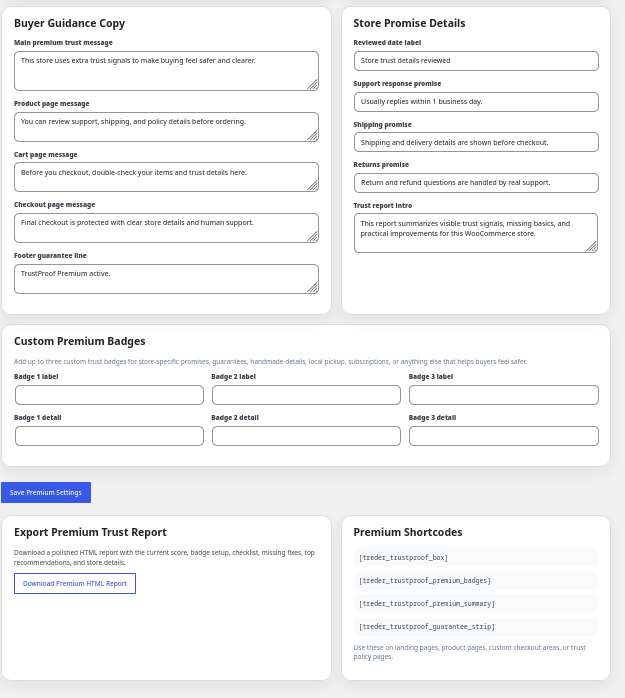
The first and default setup area. Add your business details, support info, store promise, shipping and returns notes, and buyer guidance copy.
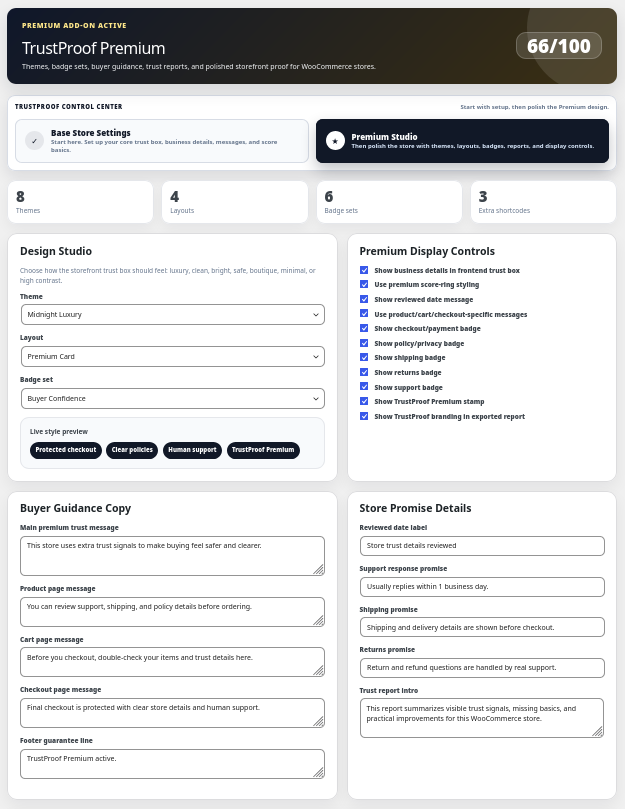
2. Premium Studio
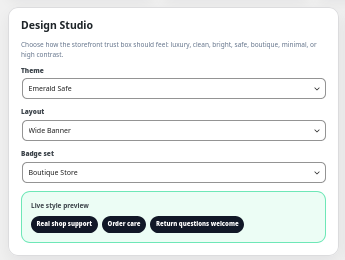
The design polish area. Pick a theme, choose a layout, select a badge set, and use the live style preview to fine-tune the trust box.
A more polished trust presentation
Premium adds design and presentation tools while keeping the free plugin's trust engine underneath.
Premium admin control center
A cleaner, more polished trust admin built on top of the free base plugin.
Premium Studio
Design controls with a live style preview, so changes are easy to see before they go live.
Themes, layouts, and badge sets
Choose a design theme, pick a layout, and apply a badge set that fits your store.
Premium display controls
More control over where and how the trust box appears across product, cart, and checkout.
Buyer guidance copy
Add reassurance and guidance messages that help shoppers feel confident as they buy.
Store promise details
Show your store promise, support details, and the commitments that build buyer trust.
Custom premium badges
Create custom trust badges that match your store and message.
Premium shortcodes
Place premium trust sections anywhere on your site with extra shortcodes.
Exportable HTML trust report
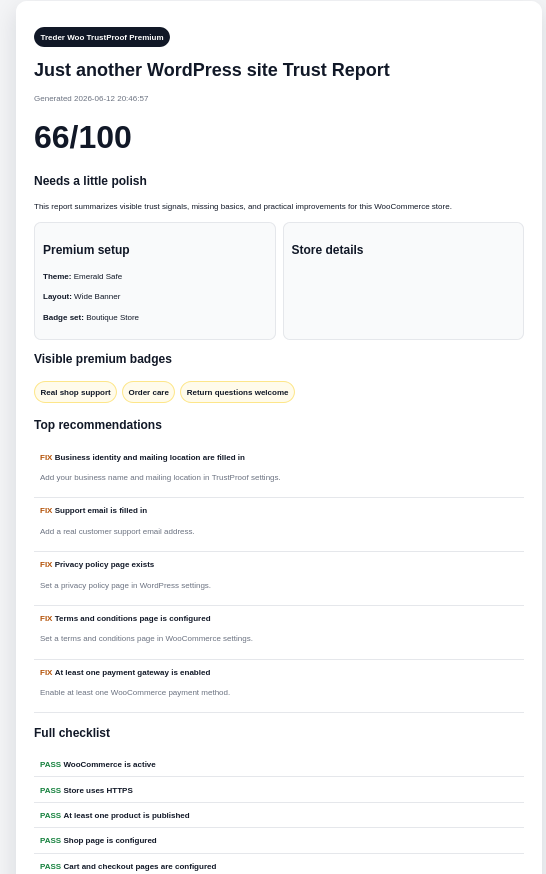
Generate a trust report as an HTML file you can review, share, or keep on file.
Free vs Premium
The free plugin is the base engine and works on its own. Premium adds the polished admin, design tools, and trust report.
| Feature | Free | Premium |
|---|---|---|
| WooCommerce trust score | Yes | Yes |
| Storefront trust box | Yes | Yes |
| Product, cart, and checkout display | Yes | Yes |
| Business details and support info | Yes | Yes |
| Shipping, returns, and reassurance messages | Yes | Yes |
| Practical trust checklist | Yes | Yes |
| Premium admin control center | — | Yes |
| Premium Studio and live style preview | — | Yes |
| Design themes, layouts, and badge sets | — | Yes |
| Buyer guidance and store promise details | — | Yes |
| Custom premium badges | — | Yes |
| Premium shortcodes | — | Yes |
| Exportable HTML trust report | — | Yes |
Place premium trust sections where you need them
Premium adds shortcodes so you can position trust content beyond the automatic product, cart, and checkout spots.
Premium trust box
Place the styled premium trust box anywhere on your site.
[treder_woo_trustproof_premium]Premium trust badges
Show your premium and custom trust badges as a standalone section.
[treder_woo_trustproof_badges]Who Premium is for
Premium is built for small WooCommerce shops, freelancers, and store owners who want a more trustworthy checkout experience.
Small WooCommerce shops
Present a polished, branded trust box without learning a pile of new settings.
Freelancers and designers
Add a consistent, professional trust presentation to client stores quickly.
Store owners
Anyone who wants a more trustworthy checkout experience and stronger buyer confidence.
Install order
Premium is an add-on, so the free base plugin goes on first.
Install the free base plugin
Install and activate Treder Woo TrustProof first. It is the required base engine.
Install the Premium add-on
Install and activate the Premium ZIP that arrives by email after purchase.
Set Base Store Settings
Fill in your business details, support info, store promise, and reassurance messages.
Polish in Premium Studio
Pick a theme, layout, and badge set, then fine-tune with the live style preview.
Getting Premium is simple
A one-time $29 payment through Stripe, then the Premium ZIP comes to your inbox.
One-time $29 purchase
Pay once through Stripe. There is no subscription for this release.
Premium delivered by email
After purchase, the Premium plugin ZIP is emailed to the email address used at checkout. Please allow up to 24 hours for delivery.
Premium FAQs
Quick answers before buying Premium.
Do I need the free plugin too?
Yes. The free Treder Woo TrustProof plugin is the required base engine. Install it first, then add the Premium add-on on top.
How is Premium delivered?
After purchase, the Premium plugin ZIP is emailed to the email address used at checkout. Please allow up to 24 hours for delivery.
Does Premium guarantee more sales?
No. Premium helps you present clearer trust signals, stronger buyer guidance, and a more reassuring storefront. It is designed to improve buyer confidence, not to promise specific sales results.
What does the trust report do?
Premium can generate an HTML trust report with your trust score, visible badges, and a checklist of what passes and what to fix. You can view a sample report linked on this page.
Can I use it for client stores?
Yes. Premium is useful for freelancers, designers, and store owners who want a consistent, professional trust presentation.
What happens to the free plugin when Premium is active?
The free plugin keeps running as the base engine. Premium takes over the visible WooCommerce admin experience and design.
Ready to make checkout feel more trustworthy?
Buy Premium for the polished trust presentation, or start with the free base plugin first.