Add a Trust Score and Reassurance Box to Your WooCommerce Store
Treder Woo TrustProof helps your store show clear trust signals. Add a simple trust score, a storefront trust box, business details, and reassurance messages so shoppers feel more confident at checkout.
It works alongside WooCommerce to surface the trust basics that often go missing, then gives you a practical checklist to fill the gaps.
Type
Free WooCommerce plugin
Best for
Small WooCommerce stores
Focus
Trust score, trust box, and reassurance
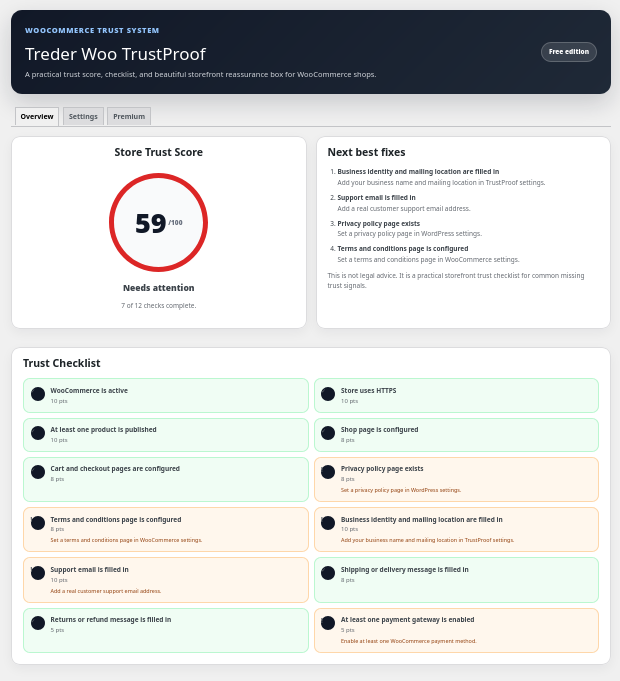
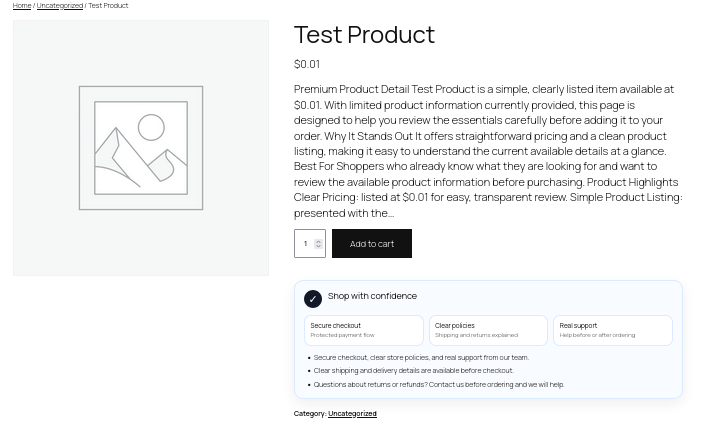
The free admin view and storefront trust box
Set your trust details in a simple admin screen, then show a clean trust box to shoppers on the storefront.
Trust basics without the overwhelm
Everything here works right after activation, so you can start showing trust signals on your store quickly.
Free WooCommerce trust score
See a simple trust score based on the store basics shoppers look for before they buy.
Storefront trust box
Show a clean trust box with your business details and reassurance messages.
Product, cart, and checkout display
Choose where the trust box appears, including product pages, the cart, and checkout.
Business details and support info
Add your business name, mailing location, and a real support email so shoppers know who they are buying from.
Shipping, returns, and reassurance
Share shipping, returns, and refund messages that answer common buyer questions.
Practical trust checklist
A clear checklist points out missing trust basics so you know what to fix next.
Shortcode support
Place the trust box anywhere on your site with a simple shortcode, no page builder required.
Trust box shortcode
Drop the storefront trust box into any page or post.
[treder_woo_trustproof]
Display options
Show the trust box automatically on product, cart, and checkout, or place it manually with the shortcode.
Upgrade path
Premium adds more shortcodes, design themes, layouts, badge sets, and an exportable HTML trust report.
Built for small WooCommerce stores
You do not need to be a WooCommerce expert. The plugin points you toward the trust basics that matter most.
Small WooCommerce stores
Great for shop owners who want clearer trust signals without learning every WooCommerce setting.
New stores getting set up
The trust checklist helps you cover business details, policies, and reassurance before sending more traffic.
DIY shop owners
A simple starting point before deciding whether to upgrade to Premium or bring in help.
Install Treder Woo TrustProof
Install it like a normal WordPress plugin ZIP, right alongside WooCommerce.
Download the ZIP
Save the free plugin ZIP from BenTreder.com.
Upload to WordPress
Go to WordPress Admin → Plugins → Add New → Upload Plugin.
Set your trust details
Activate the plugin, add your business details, then place the trust box and run through the checklist.
Treder Woo TrustProof FAQs
Plain answers before installing.
Do I need WooCommerce for this plugin?
Yes. Treder Woo TrustProof is a companion plugin for WooCommerce stores and is built to work with WooCommerce active.
Does this guarantee more sales?
No. It helps you present clearer trust signals and reassurance to shoppers. It is designed to improve buyer confidence, not to promise specific sales results.
Do I need Premium to use this plugin?
No. The free plugin works on its own. Premium is optional and adds design themes, layouts, badge sets, Premium Studio, more shortcodes, and an exportable trust report.
Where can the trust box appear?
You can show it on product pages, the cart, and checkout, or place it anywhere with the shortcode.
Can Ben help set up my store?
Yes. Use the plugin to get a head start, then contact Ben for WooCommerce setup help or a bigger store project.
Help shoppers feel confident at checkout.
Download the free plugin and add your trust box, or take a look at Premium for a more polished trust presentation.